Saturday, 26 March 2011

Java Generics Tutorial - Part II - Subtyping


In Part I we quickly explored the basics of Java generics. In this blog post we will explore how generic types behave in the Java type system.

Subtypes

In Java, as in other object-oriented typed languages, hierarchies of types can be built:
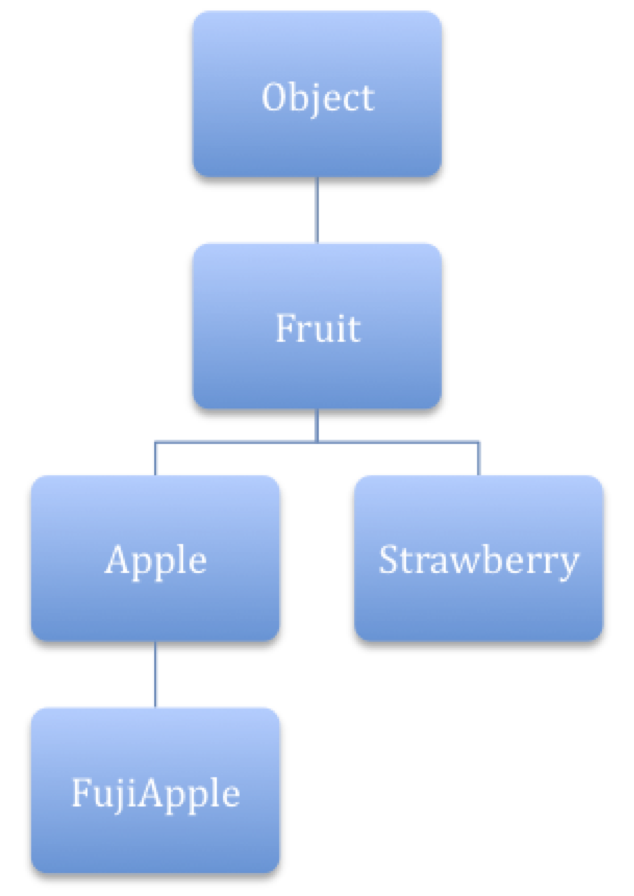


In Java, a subtype of a type T is either a type that extends T or a type that implements T (if T is an interface) directly or indirectly. Since "being subtype of" is a transitive relation, if a type A is a subtype of B and B is a subtype of C, then A will be a subtype of C too. In the figure above:
  • FujiApple is a subtype of Apple.
  • Apple is a subtype of Fruit.
  • FujiApple is a subtype of Fruit.
Every Java type will also be subtype of Object.

Every subtype A of a type B may be assigned to a reference of type B:

Apple a = ...;
Fruit f = a;

Subtyping of Generic Types

If a reference of an Apple instance can be assigned to a reference of a Fruit, as seen above, then what's the relation between, let's say, a List<Apple> and a List<Fruit>? Which one is a subtype of which? More generally, if a type A is a subtype of a type B, how does C<A> and C<B> relate themselves?

Surprisingly, the answer is: in no way. In more formal words, the subtyping relation between generic types is invariant.

This means that the following code snippet is invalid:

List<Apple> apples = ...;
List<Fruit> fruits = apples;

and so does the following:

List<Apple> apples;
List<Fruit> fruits = ...;
apples = fruits;

But why? Is an apple is a fruit, a box of apples (a list) is also a box of fruits.

In some sense, it is, but types (classes) encapsulate state and operations. What would happen if a box of apples was a box of fruits?

List<Apple> apples = ...;
List<Fruit> fruits = apples;
fruits.add(new Strawberry());

If it was, we could add other different subtypes of Fruit into the list and this must be forbidden.

The other way round is more intuitive: a box of fruits is not a box of apples, since it may be a box (List) of other kinds (subtypes) of fruits (Fruit), such as Strawberry.

Is It Really a Problem?

It should not be. The strongest reason for a Java developer to be surprised is the inconsistency between the behavior of arrays and generic types. While the subtyping relations of the latter is invariant, the subtyping relation of the former is covariant: if a type A is a subtype of type B, then A[] is a subtype of B[]:

Apple[] apples = ...;
Fruit[] fruits = apples;

But wait! If we repeat the argument exposed in the previous section, we might end up adding strawberries to an array of apples:

Apple[] apples = new Apple[1];
Fruit[] fruits = apples;
fruits[0] = new Strawberry();

The code indeed compiles, but the error will be raised at runtime as an ArrayStoreException. Because of this behavior of arrays, during a store operation, the Java runtime needs to check that the types are compatible. The check, obviously, also adds a performance penalty that you should be aware of.

Once more, generics are safer to use and "correct" this type safety weakness of Java arrays.

In the case you're now wondering why the subtyping relation for arrays is covariant, I'll give you the answer that Java Generics and Collections give: if it was invariant, there would be no way of passing a reference to an array of objects of an unknown type (without copying every time to an Object[]) to a method such as:

void sort(Object[] o);

With the advent of generics, this characteristics of arrays is no longer necessary (as we'll see in the next part of this post) and should indeed by avoided.

Next Steps

In the next post we will see how generic wildcards introduce both covariant and contravariant subtyping relations with generics.

Java Generics Tutorial - Part III - Wildcards


The previous posts introduced us to the basics of Java generics y their subtyping relations. In this posts we'll introduce wildcards and how can covariant and contravariant subtyping relations be established with generics.

Wildcards

As we've seen in the previous post, the subtyping relation of generic types is invariant. Sometimes, though, we'd like to use generic types in the same way we can use ordinary types:
  • Narrowing a reference (covariance).
  • Widening a reference (contravariance

Covariance

Let's suppose, for example, that we've got a set of boxes, each one of a different kind of fruit. We'd like to be able to write methods that could accept a any of them. More formally, given a subtype A of a type B, we'd like to find a way to use a reference (or a method parameter) of type C<B> that could accept instances of C<A>.

To accomplish this task we can use a wildcard with extends, such as in the following example:

List<Apple> apples = new ArrayList<Apple>();
List<? extends Fruit> fruits = apples;

? extends reintroduces covariant subtyping for generics types: Apple is a subtype of Fruit and List<Apple> is a subtype of List<? extends Fruit>.

Contravariance

Let's now introduce another wildcard: ? super. Given a supertype B of a type A, then C<B> is a subtype of C<? super A>:

List<Fruit> fruits = new ArrayList<Fruit>();
List<? super Apple> = fruits;

How Can Wildcards Be Used?

Enough theory for now: how can we take advantage of these new constructs?

? extends

Let's go back to the example we used in Part II when introducing Java array covariance:

Apple[] apples = new Apple[1];
Fruit[] fruits = apples;
fruits[0] = new Strawberry();

As we saw, this code compiles but results in a runtime exception when trying to add a Strawberry to an Apple array through a reference to a Fruit array.

Now we can use wildcards to translate this code to its generic counterpart: since Apple is a subtype of Fruit, we will use the ? extends wildcard to be able to assign a reference of a List<Apple> to a reference of a List<? extends Fruit> :

List<Apple> apples = new ArrayList<Apple>();
List<? extends Fruit> fruits = apples;
fruits.add(new Strawberry());

This time, the code won't compile! The Java compiler now prevents us to add a strawberry to a list of fruits. We will detect the error at compile time and we won't even need any runtime check (such as in the case of array stores) to ensure that we're adding to the list a compatible type. The code won't compile even if we try to add a Fruit instance into the list:

fruits.add(new Fruit());

No way. It comes out that, indeed, you can't put anything into a structure whose type uses the ? extends wildcard.

The reason is pretty simple, if we think about it: the ? extends T wildcard tells the compiler that we're dealing with a subtype of the type T, but we cannot know which one. Since there's no way to tell, and we need to guarantee type safety, you won't be allowed to put anything inside such a structure. On the other hand, since we know that whichever type it might be, it will be a subtype of T, we can get data out of the structure with the guarantee that it will be a T instance:

Fruit get = fruits.get(0);

? super

What's the behavior of a type that's using the ? super wildcard? Let's start with this:

List<Fruit> fruits = new ArrayList<Fruit>();
List<? super Apple> = fruits;

We know that fruits is a reference to a List of something that is a supertype of Apple. Again, we cannot know which supertype it is, but we know that Apple and any of its subtypes will be assignment compatible with it. Indeed, since such an unknown type will be both an Apple and a GreenApple supertype, we can write:

fruits.add(new Apple());
fruits.add(new GreenApple());

If we try to add whichever Apple supertype, the compiler will complain:

fruits.add(new Fruit());
fruits.add(new Object());

Since we cannot know which supertype it is, we aren't allowed to add instances of any.

What about getting data out of such a type? It turns out that you the only thing you can get out of it will be Object instances: since we cannot know which supertype it is, the compiler can only guarantee that it will be a reference to an Object, since Object is the supertype of any Java type.

The Get and Put Principle or the PECS Rule

Summarizing the behavior of the ? extends and the ? super wildcards, we draw the following conclusion:


Use the ? extends wildcard if you need to retrieve object from a data structure.
Use the ? super wildcard if you need to put objects in a data structure.
If you need to do both things, don't use any wildcard.

This is what Maurice Naftalin calls The Get and Put Principle in his Java Generics and Collections and what Joshua Bloch calls The PECS Rule in his Effective Java.

Bloch's mnemonic, PECS, comes from "Producer Extends, Consumer Super" and is probably easier to remember and use.

Next Steps

In the next post (coming soon), we will put all together in some examples to clarify how generics can be used to help us write cleaner, clearer and more type safe code.

Java Generics Tutorial - Part I - Basics

Generics is a Java feature that was introduced with Java SE 5.0 and, few years after its release, I swear that every Java programmer out there not only heard about it, but used it. There are plenty of both free and commercial resources about Java generics and the best sources I used are:
Despite the wealth of information out there, sometimes it seems to me that many developers still don't understand the meaning and the implications of Java generics. That's why I'm trying to summarize the basic information developers need about generics in the simplest possible way.

This blog post is made up of the following parts:

The Motivation for Generics

The simplest way to think about Java generics is thinking about a sort of a syntactic sugar that might spare you some casting operation:

List<Apple> box = ...;
Apple apple = box.get(0);

The previous code is self-speaking: box is a reference to a List of objects of type Apple. The get method returns an Apple instance an no casting is required. Without generics, this code would have been:

List box = ...;
Apple apple = (Apple) box.get(0);

Needless to say, the main advantage of generics is having the compiler keep track of types parameters, perform the type checks and the casting operations: the compiler guarantees that the casts will never fail.

Instead of relying on the programmer to keep track of object types and performing casts, which could lead to failures at runtime difficult to debug and solve, the compiler can now help the programmer enforce a greater number of type checks and detect more failures at compile time.

The Generics Facility


The generics facility introduced the concept of type variable. A type variable, according to the Java Language Specification, is an unqualified identifier introduced by:
  • Generic class declarations.
  • Generic interface declarations.
  • Generic method declarations.
  • Generic constructor declarations.

Generic Classes and Interfaces

A class or an interface is generic if it has one or more type variable. Type variable are delimited by angle brackets and follow the class (or the interface) name:

public interface List<T> extends Collection<T> {
  ...
}

Roughly speaking, type variables act as parameters and provide the information the compiler needs to make its checks.

Many classes in the Java library, such as the entire Collections Framework, were modified to be generic. The List interface we've used in the first code snippet, for example, is now a generic class. In that snippet, box was a reference to a List<Apple> object, an instance of a class implementing the List interface with one type variable: Apple. The type variable is the parameter that the compiler uses when automatically casting the result of the get method to an Apple reference.

In fact, the new generic signature or the get method of the interface List is:

T get(int index);

The method get returns indeed an object of type T, where T is the type variable specified in the List<T> declaration.

Generic Methods and Constructors


Pretty much the same way, methods and constructors can be generic if they declare one or more type variables.

public static <T> T getFirst(List<T> list)

This method will accept a reference to a List<T> and will return an object of type T.

Examples

You can take advantage of generics in both your own classes or the generic Java library classes.

Type Safety When Writing...

In the following code snippet, for example, we create an instance List<String> of populate it with some data:

List<String> str = new ArrayList<String>();
str.add("Hello ");
str.add("World.");

If we tried to put some other kind of object into the List<String>, the compiler would raise an error:

str.add(1); // won't compile

... and When Reading

If we pass the List<String> reference around, we're always guaranteed to retrieve a String object from it:

String myString = str.get(0);

Iterating

Many classes in the library, such as Iterator<T>, have been enhanced and made generic. The iterator() method of the interface List<T> now returns an Iterator<T> that can be readily used without casting the objects it returns via its T next() method.


for (Iterator<String> iter = str.iterator(); iter.hasNext();) {
  String s = iter.next();
  System.out.print(s);
}

Using foreach

The for each syntax takes advantage of generics, too. The previous code snippet could be written as:

for (String s: str) {
  System.out.print(s);
}

that is even easier to read and maintain.

Autoboxing and Autounboxing

The autoboxing/autounboxing features of the Java language are automatically used when dealing with generics, as shown in this code snippet:

List<Integer> ints = new ArrayList<Integer>();
ints.add(0);
ints.add(1);
      
int sum = 0;
for (int i : ints) {
  sum += i;
}

Be aware, however, that boxing and unboxing come with a performance penalty so the usual caveats and warnings apply.

Next Steps

In the next part of this post, we will see subtyping relations of generic types.

Wednesday, 23 March 2011

Firefox 4 Downloaded Over 7 Million Times And Counting

Mozilla team has released the latest version of its flagship product - Firefox 4.

Firefox 4 has been downloaded over 7 million times since its official release. This new avatar of the popular web browser from Mozilla stables makes extensive use of HTML 5 to render web pages. It also uses hardware acceleration when displaying HTML 5 pages - drawing on the power of a computer's graphics processor to improve the speed of complex visuals.
Read more »

Tuesday, 22 March 2011

Atlassian JIRA: In-Place Database Upgrades

Upgrading JIRA to a newer version, or even migrating JIRA from a machine to another, has always been a pretty simple task. Oversimplifying (only a little bit), a JIRA migration can be accomplished following these steps (this is an excerpt of the Official JIRA Documentation):
  • Prevent users from modifying JIRA while the migration is taking place.
  • Export the old JIRA data using the export tool.
  • Back up the old JIRA: installation directory, home directory, database. Attachments and indexes should be backed up only if stored outside the JIRA home directory (which is not the default installation).
  • Install the new JIRA.
  • Migrate JIRA configurations from the old instance to the new one.
  • Connect the new JIRA to a new, empty database.
  • Start the new instance and use the import tool to load the data exported from the old instance.
I acknowledge that it might seem otherwise, but the migration process is really easy to perform. Unfortunately, the migration process has some drawbacks that affect your users while it is taking place:
  • Users cannot use JIRA during the migration process.
  • The import and export phases are not constant-time tasks: the time required to complete them depends on the amount of data that's been migrated and it can quickly become an issue for large JIRA installations.
Although unsupported up to JIRA v. 4.3, I've seen users neglecting the import/export phase and trying to connect the new JIRA instance to the old database. Most of the times, it worked but it would not update the database structures used by JIRA, with at least a performance degradation as a consequence.

In-Place Database Upgrades

Atlassian JIRA v. 4.3 now officially supports In-Place Database Upgrades when upgrading from at least JIRA 4.0.x.

This means that, during an upgrade process, the administrator is not required to perform the export/import phase any longer. Instead, he will be able to connect the new instance directly to the old database: during the first startup, JIRA will perform a check of the database structures and will upgrade them accordingly.

The bigger the JIRA instance, the more time will be saved during an upgrade process and the less downtime will be experienced by JIRA users.

Upgrading JIRA has never been so easy.

Monday, 21 March 2011

Atlassian JIRA 4.3 Has Been Released With a Wealth of Exciting New Features

On March, 16th Atlassian released a new version of its flagship issue tracking and project management solution: Atlassian JIRA v. 4.3.

This new release comes with a bunch of exciting new features both for users and for administrators. This are just some of the new JIRA features that you can find in this release (the following list is an excerpt of Atlassian JIRA v. 4.3 Release Notes):
  • Revamped user management and full LDAP integration.
  • New Plugin Management System.
  • In-place JIRA upgrade.
  • Improved search capabilities.
  • Support for Google Chrome and Safari 5.
In the posts in this series I'll explore some of these features:

Part I - Full LDAP Integration
Part II - In-Place Database Upgrades

Nevertheless, the best thing you can do and the quickest way to discover what's new in the latest JIRA is checking it out yourself: download JIRA and get started.

Atlassian JIRA: Full LDAP Integration

Atlassian introduced many new features in JIRA v. 4.3 and one of them is one that users have been waiting for for a long time: full LDAP integration.

Up to now, administrators basically had two options to manage JIRA users:
  • Using JIRA internal user registry.
  • Using an external LDAP directory for authentication only.
  • Using Atlassian Crowd.
Please note that Atlassian Crowd provides a broader identity management and Single Sign-On solution and it is out of scope in this blog post.

    The Problem

    User management can be an issue and a burden for the administrator even small-sized business: without a "user registry", the complexity of keeping in sync user accounts throughout the organization grows both with the number of accounts and with the number of environments to be kept in sync (such as workstations, servers, applications, etc.).

    To solve this problem, organizations often centralize the administration of user accounts on some sort of "user registries" integrated with all of their environments, from operating systems to applications. Nowadays, LDAP is one of the most commonly used protocol to integrate such registries and it is supported by almost any enterprise-level operating system and many enterprise applications.

    Up to version 4.2, Atlassian JIRA could integrate with an LDAP directory just for authentication: this factored out only part of the user management complexity (basically, the management of an user's credentials) but administrators still had to provision JIRA with user accounts (and all of their attributes).

    The Solution: Full LDAP Integration

    Atlassian JIRA v. 4.3 comes with full LDAP integration. Administrators can now:
    • Integrate JIRA with one of the supported LDAP directories.
    • Use JIRA two-way synchronization.
    • Integrate JIRA with more than one directory at a time.
    • Administer user directories with a revamped, easy to use GUI.
    • Use JIRA as an user directory for Atlassian Confluence.

    Supported Directories

    Atlassian JIRA now integrates with many of the most commonly used directory servers out there:
    • Apache User Directory (v. 1.0.x and 1.5.x).
    • Apple Open Directory (read-only).
    • FedoraDS (read-only POSIX schema).
    • Novel eDirectory Server.
    • OpenDS.
    • OpenLDAP.
    • OpenLDAP (read-only POSIX schema).
    • Oracle Directory Server Enterprise Edition (former Sun Directory Server Enterprise Edition).
    • Microsoft Active Directory.
    • Generic LDAP directory servers.
    • Generic POSIX/RFC2307 directory servers (read-only).
    Although disable by default, it's worth noting that JIRA also supports nested groups, the ability to recursively scan group memberships in the case that a group be member of another group.

    User Directories Management Made Easy

    The setup and configuration of user directories can be easily performed using the JIRA Administration Console, whose new User Directory windows has been redesigned from scratch:


    Using the GUI, the administration will be able to configure most of the parameters to customize and fine-tune the integration of JIRA with your directory servers. Some of the tuneable parameters are:
    • Directory Server settings.
    • LDAP Schema: to configure the Base DN and, optionally, the User DN and the Group DN to limit the search scope to a sub-tree of the whole directory.
    • LDAP Permission: to decide whether the directory will be accessed in read-only mode or in write-mode, in which case modifications to users, groups and memberships made in JIRA will be synced back to the LDAP directory.
    • User and Group Schema settings: to establish object classes, filters and attribute names.
    • LDAP cache and connection pool settings.


      Conclusions.

      Atlassian JIRA v. 4.3 can now be easily integrated with the directory server of choice of your organization. Even unexperienced administrators will be able to quickly setup and configure an user directory for JIRA in a matter a few minutes, using the new User Directories window of the JIRA Administration Console.

      No doubt, JIRA has never been so close to its users.